
The opening frame
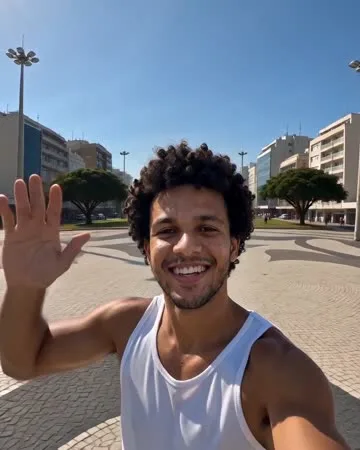
An ultra-wide selfie angle from slightly above eye level: you in an open plaza in daylight, chin up, waving at the lens. The only frame where your face is legible.
AI video effect
Add one photo and the effect opens on you waving up from a city plaza, then pulls straight back through the sky until the whole planet sits in black space. No drone, no stock footage, nothing to stitch on.
Your photo
One photo is enough: solo or the two of you.
Effect
Earth Zoom OutMore effects
Video & sound
This video: 4 credits · 10 songs a month for $29.90, or 40 a year for $100 View pricing
What it looks like
The short answer
Earth Zoom Out is an AI video effect that turns one photo into a single unbroken pull-out: from an arm’s-length selfie in a city plaza, up over the rooftops and the coastline, out through the atmosphere, until the whole Earth hangs in space.
Most effects here are performances; this one is a camera move. Editors use it as the first second of a longer video or the join between two shots. The plaza, skyline and planet are invented around your face, so a photo against a bedroom wall works as well as one outdoors. Because the pull-out is one continuous take, there is no seam to hide — play it backwards and you fall from orbit onto yourself.
How it works
Choose a front-facing selfie or waist-up shot where your face fills a good part of the frame, in even light. Upload it in the panel above.
The last frame of this clip is a whole planet. Your face is a few pixels wide by then, so a photo where the face is already small disappears. Face-forward and centred is what survives the zoom.
The effect is already chosen. Open the video settings only to switch to a vertical frame; leave the length at the default if you use the clip as an opening or transition.
A vertical frame keeps the plaza full-bleed on a phone and gives the pull-out more travel. In landscape the move spends its first seconds on empty pavement.
The clip renders in about a minute. Download the MP4 and use it as it renders, or reverse it so the camera falls from space and lands on you.
Both directions work. Forward is an opening that hands off to your footage; reversed, it is a reveal that lands on the shot you cut to next.
Every clip, itemised
An ultra-wide selfie angle from slightly above eye level: you in an open plaza in daylight, chin up, waving at the lens. The only frame where your face is legible.
The camera lifts and tilts down in one movement, turning a portrait into a map. It accelerates: the plaza first, then the blocks, then the streets. You stay near the centre.
Rooftops flatten into a grid, the grid reaches water, and the shoreline draws a hard edge across the frame.
The frame edge curves, clouds slide underneath, and a thin blue band holds the top of the atmosphere. The camera keeps accelerating, so the curve arrives without a cut.
The Earth settles into a small sphere in a black starfield. No logo, no label, no text — just the planet, and the clip ending there.
A rising swell through the climb that thins into a quiet, airy drone once the planet is framed. It dies down at the end, so it sits under your own music.
One continuous move: no cuts to hide a change of scale, no speed ramps. For a slower reveal, generate a longer clip rather than slowing the render.
What people make
“an opening that hands off to my real footage”
Cut away as soon as the planet is framed and hard-cut to your shot. The jump from planetary scale back to a person is the hook.
“the trip that felt like the whole world”
End a travel montage on the pull-out instead of another sunset. The city you left becomes a dot — sharper than any caption.
“a joke about how small my deadline is”
Pair the clip with a line about your rent or your group chat. The contrast does the work.
“me and my friend, side by side in the plaza”
Add one photo of each, or a single photo of both, and you start the take together. Both figures hold through the plaza and skyline.
“a product that starts small and ends global”
Use it behind a size or reach claim. Nothing in the clip is tied to a person, so a founder photo works the same as a product shot.
What makes a good result
The first frame is a wide shot, so the file need not be huge — but it must be in focus. A soft photo becomes a smudge by the second second.
The camera keeps the subject centred as it rises. A face in the corner of a group photo drifts out before the rooftops appear.
The plaza is invented for you. Kitchen wall, bedroom, garden — none of it reaches the clip, so you need not hunt for an outdoor photo.
Your own, or a friend’s with permission. A stranger or a public figure is a rights problem, and review rejects those clips.
Questions
What editors ask before they spend credits on a pull-out.
Upload a clear, front-facing photo, keep Earth Zoom Out selected and generate. The clip opens on you waving up from a plaza, rises without a cut through the city and coastline, and ends on the whole planet. About a minute.
No. One photo is the whole input, and the pull-out is a single take, so nothing needs stitching or keyframing. Any editor that flips a clip’s direction handles the reverse.
Yes, and many editors do. Play it backwards so the camera falls from space onto you, then hard-cut to your shot. The drone at the end becomes an opening sound reversed.
Yes. Upload one photo of each, or a single photo of both. You stand side by side and the camera rises away from you together. Keep the faces a similar size.
No. The plaza, skyline and coastline are invented around your face, so an indoor photo works as well. What matters is a sharp face facing the camera.
No. The whole take is generated, including the planet. It is a stylised view from orbit, not a satellite photo, so no labels or borders are there to check against a map.
Four credits for the standard five seconds. Every extra second is charged, so a slower reveal or a longer hold costs more — and if the render fails, the credits come back to you.
Ready when you are
One photo, four credits, about a minute. The plaza, skyline and planet are already in the effect — you bring the face.
Failed renders are refunded automatically — you never pay for a clip you did not get.