The opening
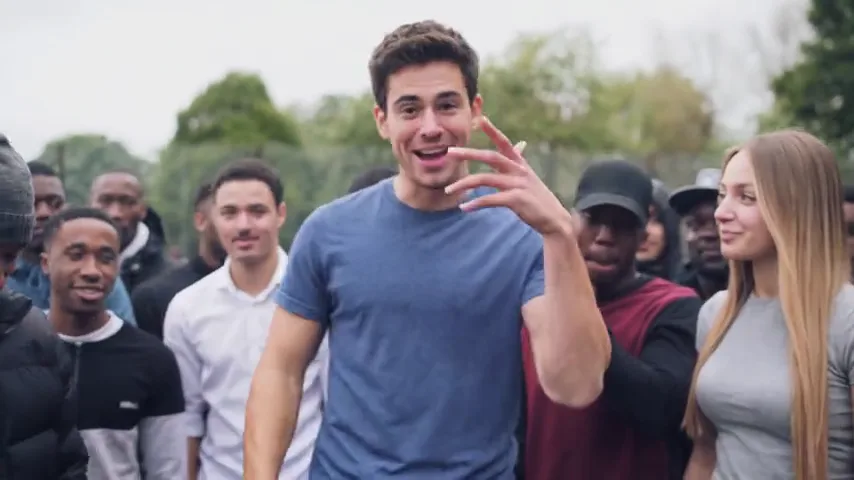
Grey London sky, trees, a packed crowd. The lead stands closest to the camera, one hand on the chest, the other arm out, already talking to the lens.
Upload one photo of the person who takes the mic, plus one of each friend. The effect drops you into the 2015 park freestyle: lead at the front, friends on either side, crowd behind, ten seconds with the original sound.
Photos of 1 people
One clear photo per person, facing the camera, full-body if you have it. Photo 1 is required; the rest are optional.
Effect
Stormzy Shut UpMore effects
Video & sound
This video: 8 credits · 10 songs a month for $29.90, or 40 a year for $100 View pricing
It is a ten-second AI clip that puts your face at the front of Stormzy’s 2015 “Shut Up” park freestyle. One photo makes you the lead; add two more and your friends take the places of the two men nearest the camera, with the crowd and the original audio kept intact.
The source is one handheld take shot in a London park and uploaded on 17 May 2015; it has since passed 142 million views. The AI version keeps that footage’s timing, gestures, crowd and sound and swaps only the people in front. A kitchen selfie still looks like it belongs in the park, because the place was never yours to supply. The trend spread through a CapCut template in November 2026, then into browser tools like this one, where two friends can join the lead.
Choose a clear, forward-facing photo of the lead, waist-up if you have one. Then add one photo each for up to two friends. Use the numbered slots in the panel above.
One slot holds one person. A group photo makes the model guess which face is the lead, and it usually guesses wrong. Separate photos also keep each friend’s hair and outfit.
Stormzy Shut Up is already selected, with ten seconds and 16:9 set. Change only the resolution if you need a cheaper or sharper render.
The horizontal frame makes the bit read: the lead needs room to gesture and friends must stay visible at the edges. A vertical crop pushes both friends out.
Press the generate button and wait for the render. Download the MP4 when it appears; the freestyle audio is already inside the file.
The sound is part of the effect, not a track you add later. Posting the MP4 as downloaded keeps lip movement, gestures and audio on the same ten-second clock.
Grey London sky, trees, a packed crowd. The lead stands closest to the camera, one hand on the chest, the other arm out, already talking to the lens.
The performance is all arms: palms out, wide to the crowd, back to the chest. The AI keeps that choreography and fits your lead’s shoulders to it.
Photo 2 fills the left position and photo 3 the right, replacing the two men closest to the original performer. They nod along; the lead does all the rapping.
The same park crowd stays behind all three of you. Nobody in it comes from your photos, so background faces do not change between renders.
A handheld swing that drifts with the lead’s arms. A friend at the edge can slip partly behind a shoulder; that is the original camera, not an upload mistake.
The freestyle’s own ten seconds, vocals and beat together. It starts with the first frame and ends with the clip: no intro to trim, no fade to add.
A last turn to the lens, a grin, and the clip stops while the vocal continues. That hard ending invites a rewatch and leaves a clean cut point.
Give photo 1 to the performer, then put the quiet ones on the sides. The gap between the lead’s energy and the friends’ nodding is the joke.
“the friend who never stops talking, on a park mic”
One photo of the birthday person and two of the group. It reads as a public roast with no caption needed.
“a birthday video where the birthday person takes the mic”
Render one clip with three faces from the chat, send it back, and let everyone argue about who was placed where.
“the group chat finally gets a music career”
Three faces suggest a whole crew. Use the coach as lead and two players on the sides, then post it after the last game.
“the team captain doing a park freestyle”
Pair the clip with a time and a place. The park supplies the atmosphere; you supply the faces and the caption.
“tonight, we are outside”
Crop a friend out of a group shot before uploading, or take a fresh photo. Slots are positions in the scene, not a collage: two faces in one file cannot be split.
The lead is lit like the original performer, from the front. A backlit photo or a turned face gives the model too little, and the likeness drifts by the second second.
The lead carries every gesture. A photo of someone mid-laugh or mid-sentence gives the model a better mouth and brow than a neutral passport stare.
Use your own photo or a friend’s with permission. Famous faces and photos of children are not accepted; a clip of someone who did not consent is a problem no caption fixes.
What people ask before they put their friends in the park.
Add one photo for the lead and up to two for friends, keep Stormzy Shut Up selected, and generate. The result is a ten-second 16:9 clip with the original audio attached.
Yes, up to two. Photo 1 is the lead at the front, photo 2 takes the left and photo 3 the right. Each person needs their own photo; a group shot is not split into friends.
The first slot. That face sits closest to the camera and carries every gesture, so choose someone who wants to lead and a photo where their face is clear.
The camera swings and the original crowd stands close. A friend on the edge can pass behind a shoulder. Put the friend who most wants to be seen in the right-hand slot, nearer the lead.
No. The effect is built for your face and your friends’ faces, and photos of public figures are not accepted. The park, crowd and sound already carry the reference; the lead should be someone who agreed to be there.
No. This is an independent tool. It recreates the staging of a publicly posted freestyle and is not endorsed by Stormzy, his label, the hosting platform or the template makers.
One photo for the lead, two more if you have them, and ten seconds of the freestyle with the sound on. The crowd is already waiting.
Failed renders are refunded automatically — you never pay for a clip you did not get.
