
The ground
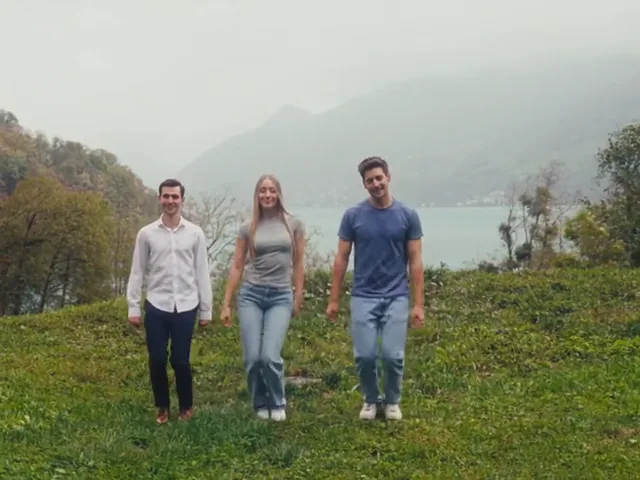
Wet green grass with a visible slope, not a flat lawn. The angle creates the downhill bounce, and the camera sits low enough to keep the skyline empty.
Bring one, two or three people and the effect puts you on the trend’s misty green slope: bouncing downhill, a close-up in the middle, then walking together with the lake behind.
Photos of 1 people
One clear photo per person, facing the camera, full-body if you have it. Photo 1 is required; the rest are optional.
Effect
Wassup in a MinuteMore effects
Video & sound
This video: 12 credits · 10 songs a month for $29.90, or 40 a year for $100 View pricing
Newest first; the top line is this page’s last edit.
Page update: the four shots now carry timecodes, and the group-photo input has its own instructions. Browse every AI video effect
CapCut templates appeared, so people could join the sound without filming on a slope.
The sound passed 32,000 videos; the original post kept climbing past twenty million plays.
Three friends posted the first hillside take, bouncing downhill in one unbroken shot.
It is a fifteen-second clip that puts your faces into the hillside dance everyone is posting: one to three people bounce down a slope toward the camera, the middle dancer takes a close-up, and the group walks back with a lake behind.
The original take was cut into four shots, which is why the same eleven-ish moves reappear in every version. What makes a clip land is simpler than it sounds: the person in the middle must be the person you meant to put there. The sky and the grass are fixed, so an indoor photo still ends up on a hillside.
The cut follows the source take. Positions stay put; only the camera distance changes.
A low camera looking up the hill. All three bounce downhill with hands swinging at the hips, then reach for their heads on the beat. The right dancer starts nearest the lens.
Cut to the centre dancer, chest-up. A point at the lens, a thumbs-up, a head tilt, mouth moving with the line. The other two dance behind, out of focus.
A wide shot of the three side by side, walking toward the camera. Hands open at the hips, a shrug, a sway. The lake and cloud-covered ridge sit behind them.
A distant shot on a second slope. The three separate and dance loosely in their own lanes until the frame ends.
Two people means the left one takes the close-up; one person dances alone in the centre and keeps it.
Pick one, two or three above the upload box. Then choose A photo each for a file per dancer, or One group photo for the whole crew.
The inputs are not interchangeable. Separate photos keep each face and outfit tied to its position; a group photo asks the model to read faces left to right and assign them.
With separate photos the first upload is the centre dancer. With a group photo, the middle person in the picture takes that place.
The centre dancer gets the close-up between 3.6 and 7.2 seconds and is the only face the camera comes near. Whoever lands there is the clip’s main character.
The defaults match the trend: fifteen seconds, 4:3, 720p. Press make, wait for the render, then download the MP4 with the audio inside.
A five-second render stops inside the first downhill run and never reaches the close-up. The four shots need the full fifteen seconds.
Wet green grass with a visible slope, not a flat lawn. The angle creates the downhill bounce, and the camera sits low enough to keep the skyline empty.
Grey, misty, no hard sun. Faces are lit evenly with no strong shadow, which is why photos shot indoors blend in instead of looking pasted on.
Three dancers fill the frame side by side. Photo one is centre, photo two stands right and nearest the camera in the opening shot, photo three stands left. With two people the right slot stays empty.
Clothing comes from your photos, head to toe, and stays the same across all four cuts. Accessories that are not in the photo do not appear.
The choreography is mostly arms and knees: swinging at the hips, grabbing the head, opening the palms, shrugging. Hands stay loose, never clenched.
Fifteen seconds of the dance’s own audio, already inside the MP4. It starts at the first frame, so there is no intro to trim and no track to add.
One photo each, the most talkative in the centre. The hillside is the trip; the clip is the proof it never happened.
“the trio who planned the trip and never booked it”
Two photos work just as well. The left dancer takes the close-up, and the empty third place reads as a deliberate duo.
“two friends, one slope, no third wheel”
Three photos from the chat, the birthday person in the centre. Send the MP4 with no explanation; the close-up does the work.
“the birthday person gets a hillside dance from the group”
Use the group photo input with a picture everyone already has. Nobody has to hunt for a solo shot.
“the project group that survived the semester”
The walk at the end and the downhill run both show legs. A crop at the chest leaves nothing to animate below the waist.
With A photo each, two faces in one file cannot be split across slots. With One group photo, do the opposite: shoulder to shoulder, no one behind another, every face at the lens.
Wear what you want to appear in. The effect copies clothing exactly, so a hoodie in the reference stays a hoodie through all four shots.
Use your own photos, or photos of friends who said yes. Public figures and pictures of children are rejected.
What people ask before they upload — mostly about how the photos arrive.
Pick one to three people, upload a photo for each or a single group photo, keep fifteen seconds and 4:3, then generate. You get an MP4 with the dance sound inside.
Separate photos give the most control: one file, one person, one position. A group photo is faster when you have a picture of everyone, but nothing may overlap.
The middle dancer. With separate photos that is the first upload; with a group photo it is the person in the centre. Arrange the shot before uploading if a specific person needs it.
Yes. One photo puts you alone in the centre and the close-up is yours; the other two places stay empty.
The trend’s own clips are 4:3, and the three-across walk only fits that width. A vertical crop pushes the outer two dancers off the frame.
The price depends on the resolution you pick and shows on the button before you commit. It is the same for one, two or three people; a failed render is refunded.
Yes. The dance audio is baked into the MP4 for the full fifteen seconds, so the download is ready to post.
No. This is an independent tool. It rebuilds the staging of a publicly posted dance — the slope, the four shots, the timing — and is not endorsed by the original dancers or the remixer.
One, two or three faces, a photo each or a group shot, and fifteen seconds of the dance with the sound already in it.
Failed renders are refunded automatically — you never pay for a clip you did not get.
